01Mac shell

Commands run on your Mac.

02System panels

CPU, memory, storage and processes.

03Phone tools

DNS, HTTPS, subnet and SHA-256.

MAC APP

Run commands on your Mac.

FFui opens a local pseudo-terminal. The surrounding panels show CPU, memory, power, network, process and file information when macOS makes it available.

The Tools panel can resolve a hostname, inspect its TLS certificate, check a port on 127.0.0.1, list local TCP listeners and browse nearby Bonjour services. Startup begins with a scripted command sequence, then opens your shell.

View the browser version
MAC APP LOCAL SESSION
01
Shell

Command input and output through a local PTY.

02
Readings

Values from the Mac; unavailable data is labelled.

03
Checks

DNS, TLS, local ports and nearby services.

eDEX-UI components · FFui integration

PHONE BROWSER

Network checks on your phone.

Open FFui in a phone browser to look up DNS records, read HTTPS response headers, inspect your public IP or measure an HTTPS round trip. Subnet calculation and SHA-256 hashing run on the phone.

You can tap a tool or enter its command. The phone browser does not run a Mac shell or discover Bonjour services.

Open phone tools
PHONE BROWSER WEB PREVIEW

Tools run when you open the browser version.

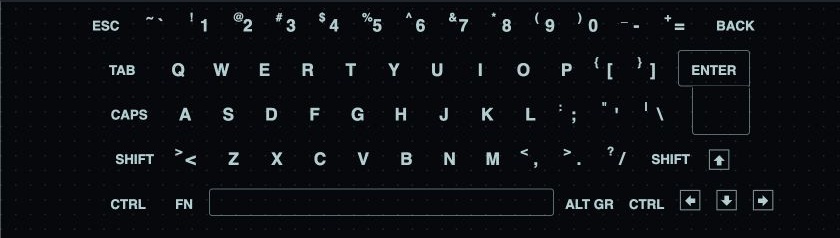
EDEX-UI KEYBOARD

The original keyboard layout.

FFui uses the key layout and styling from the open-source eDEX-UI project. Its on-screen keys send input to the Mac terminal.

Original eDEX-UI keyboard integrated into FFui Inspect the full keyboard

NEARBY ON IOS

Browse Bonjour services.

In the iOS app, Nearby scans for services advertised on your local network. Tap a result to see its service type, name and resolved host or port when available.

Scanning requires Local Network permission. If no supported services are advertised, the list is empty. Nearby does not measure distance or direction and is unavailable in a browser.

Read the feature reference
BONJOUR DISCOVERYIOS APP
12 TYPESService types scanned

Web · SSH · file sharing · AirPlay · Cast · printers and others

RESULTSAdvertised services

Service name, type, host and port when available.

FEATURE REFERENCE

What runs where.

Mac app

Local terminal
Your Mac shell runs in a local PTY.
System readings
CPU, memory, storage, power, network and processes when macOS provides them.
Network checks
Resolve a hostname, verify its TLS certificate, test a local port, list listeners or browse Bonjour services.
Files
See the current directory beside the terminal.

Phone browser

dns example.com A
Look up DNS records for a public hostname.
headers cloudflare.com
Read status and selected HTTPS response headers.
ip / rtt
Inspect the public route or measure an HTTPS round trip to FFui.
subnet 192.168.1.13/24
Calculate IPv4 network, mask and host range on the phone.
hash hello
Calculate SHA-256 on the phone; input is omitted from history.
Does the browser run my Mac shell?

No. The browser runs the phone network tools and shows a preview of the desktop layout. Shell access, local files and Mac readings require the installed Mac app.

Which devices appear in Nearby?

The iOS app scans twelve Bonjour service types on the current local network. It groups services when they resolve to the same host. Devices without a supported advertised service may not appear.

Where are network requests sent?

DNS and HTTPS checks send the public hostname you enter to FFui’s edge service. Subnet calculations and text hashes run on your device. Read the privacy details.

DOWNLOADS

Get FFui for Mac.

The Mac download includes Apple silicon and Intel builds. The network tools also work in a phone browser. Bonjour discovery requires the iOS app.

The Mac preview is ad hoc signed and not Apple notarized. Installation help.